 Android widgets
Windows 98 widgets for Android
Risocast for Android comes with three home-screen widgets drawn in real Windows 98 pixels: Now playing, a one-row Song strip and Today. They show whatever is playing in any music app, or on your PC when the phone is quiet, with buttons that play, skip and like, and they keep counting when you're offline.
The three widgets
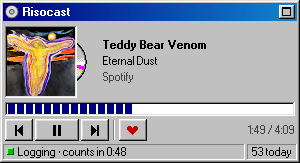
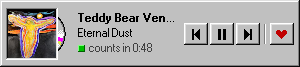
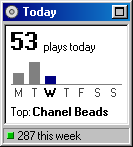
What they do
- Any music app. They read the same now-playing information as your lock screen, so Spotify, YouTube Music, SoundCloud, Apple Music, Deezer, Poweramp and the rest all show up. See a now-playing widget for every app.
- Your PC too. When the phone isn't playing, they show what the Risocast app on your PC is playing (“On your PC · Spotify”), and the buttons play, pause and skip it there. See control your PC's music from your phone.
- When it counts. A green light while the song is being logged, a countdown to when it counts (“Logging · counts in 0:48”), then “Logged to your record”. The rules are the same as everywhere: half the song or four minutes.
- Like from the home screen. The heart likes the song on Risocast, and loves it on Last.fm if you've connected it. Offline, the like waits and is sent later.
- Offline. Plays counted on the phone are added to Today straight away and sent when you're back online; the status bar says how many are waiting (“Offline · 3 to send”).
- A spinning CD. While a song plays, a pixel CD slides out of the cover's sleeve and spins, like the Song strip on Windows. Paused, it slides back in.
- Taps go somewhere useful. The song opens its window in the app (plays, listeners, genres, tempo and key); the title bar's button opens Risocast; Today opens your profile.
Pixel for pixel, on any phone
The widgets aren't a theme laid over standard Android parts. Each one is drawn as a single picture at your screen's exact size, with every Windows 98 pixel a whole number of screen pixels (three on a typical 1080p phone): the same pixel font as the desktop app, grey bevels, sunken panels, a blue title bar, a block progress bar. Nothing is stretched, so the text and the edges stay sharp.
Some home screens, Samsung's One UI among them, quietly shrink widgets to fit their grid. The widgets measure that and draw for the size you actually see, so they look the same on a Galaxy as on a Pixel.
Add them
- Install Risocast for Android (it's coming to Google Play) and sign in.
- Turn on phone listening: File › Connect media…, then Turn on… under Phone listening. Android asks you to allow Risocast under Notification access; that's how it sees what's playing.
- Touch and hold an empty spot on your home screen, choose Widgets, find Risocast and drag Now playing, Song strip or Today onto the screen.
Questions
- Which Android versions do they work on?
- Android 6 and newer show the widgets. Their separate buttons need Android 12 or newer; on older versions, tapping a widget opens the app.
- Do they drain the battery?
- They're redrawn when the song or your numbers change, and every few seconds while music plays with the screen on. With the screen off they wait. They look at your PC every 15 seconds only while the screen is on and the phone isn't playing.
- Can I resize them?
- Yes. Now playing and Today resize both ways, the Song strip widens; the drawing fits whatever size you give it.
- Do they work on the lock screen?
- No, they're home-screen widgets.
- Is there an iPhone version?
- No. There's no iPhone app yet; on an iPhone, use the web app with Spotify or Last.fm.
- Do they cost anything?
- No. Risocast and its widgets are free, with no ads.
See also
Risocast is free. Install it once and it logs everything you play.
Updated 7 October 2026
 Risocast Help
A music log that fills itself in. It records the songs you play on your computer and your phone, turns them into your top songs, stats and a public profile, and finds people whose taste overlaps with yours.
Yes. The app and the website are free.
A song counts once half of it has played, or four minutes — whichever comes first. Songs of 30 seconds or less, and videos or podcasts over 20 minutes, never count.
On Windows, anything that shows up in Windows' media controls: Spotify, YouTube Music, Apple Music, Deezer, browsers, foobar2000, Windows Media Player and more (VLC, iTunes and MusicBee through their free media-controls plugin). On Android, any music app — it reads the same now-playing info your lock screen shows. You can also connect Spotify or import from Last.fm.
Yes. Plays are counted on your device and sent when you're back online, and the phone app opens without a connection.
It does the same core job — scrobbling, automatically — without plugins per player, and adds taste matching: see who listens like you and how much your taste overlaps.
Your profile and listening are public so people with similar taste can find you, unless you make your profile private (then only your buddies see it); your email never is. Nothing is sold and there are no ads; anonymous usage analytics (Microsoft Clarity, Google Analytics) show what to improve. See the privacy policy for the details.
More in Help, the guides and the privacy policy.
 Welcome to Risocast
 Risocast
Your music, logged. Your people, found.
A small player that sits in your tray, writes down every song you play, and shows you who listens like you.
102 songs logged today
Android is coming to Google Play. Get notified
How logging works
On Windows, Risocast reads the system media controls, so any player counts: Spotify, YouTube Music, Apple Music, Deezer, browsers, foobar2000. No plugins.
On Android the app reads what any music app is playing (it's coming to Google Play). Anywhere else, connect Spotify or a Last.fm username.
Taste twins
See how much your taste overlaps with anyone's, and find the people who listen most like you. The match comes from what you both actually play, not a list of favourites.
Open PeopleWeekly Disc and Taste Map
Every week becomes a disc of your top songs. Every record you play goes on a map, grouped by genre.
Real ones, from the maker's own listening.
Download Risocast
Risocast is free for Windows 10 and 11. Android is coming to Google Play; on any other device, use the web app with Spotify or Last.fm.
- Version 4.0.10 · Windows 10 and 11 (64-bit) · about 100 MB
- Updates itself: new versions download in the background and install on restart.
- Every installer is published with its SHA-256 checksum on the releases page.
 FeaturesGuides
 Track music on WindowsLog YouTube MusicApple Music statsFind people like youPlayers that workLog VLCLog foobar2000Log MusicBeeiTunes on WindowsLog DeezerLog TidalLog SoundCloudAmazon MusicWindows Media PlayerSpotify historyTop songs of all timeWhat genre is it?Describe your tasteExport your dataComing from Last.fmWidget for every appPC music from your phoneWindows 98 home screenCompare