 PC music from your phone
Control your PC's music from your phone
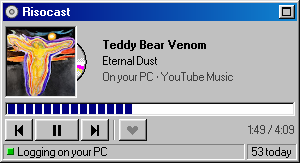
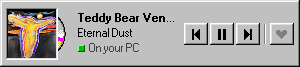
Put Risocast on your PC and your phone, signed in to the same account. When the phone isn't playing anything, its Now playing and Song strip widgets show your PC's song, and their buttons play, pause and skip it on the PC, from anywhere with a connection.
What it looks like
Set it up
- Download Risocast for Windows and sign in. It can sit in the tray; it just needs to be running.
- On your phone, install Risocast (it's coming to Google Play) and sign in to the same account.
- Add the Now playing or Song strip widget: touch and hold an empty spot on the home screen, choose Widgets, find Risocast.
- Play music on the PC. Within about 15 seconds the widget shows it, with “On your PC” under the artist.
- Press previous, play or pause, or next. The PC acts on it in a second or two.
Which player, which device
- Any PC player that Windows can see: the buttons work like the media keys, so Spotify, YouTube Music in Chrome or Edge, Apple Music, Deezer and foobar2000 all respond. If a song shows in Windows' media controls, it works (see which players work).
- The phone comes first. While the phone is playing, the widgets show the phone's song. When both are quiet, they stay on whichever you used last, so pausing the PC from the widget doesn't jump to an old song on the phone.
- The app does it too: the Listen tab in Risocast shows your PC's song with the same buttons.
Questions
- Do the phone and PC need to be on the same Wi-Fi?
- No. The buttons go through your Risocast account, so the phone can be on mobile data anywhere.
- Does it work on a Mac?
- No. There's only a Windows app for now.
- Can it change the volume?
- Not from the widget: it has previous, play or pause, next and like.
See also
Risocast is free. Install it once and it logs everything you play.
Updated 7 October 2026
 Risocast Help
A music log that fills itself in. It records the songs you play on your computer and your phone, turns them into your top songs, stats and a public profile, and finds people whose taste overlaps with yours.
Yes. The app and the website are free.
A song counts once half of it has played, or four minutes — whichever comes first. Songs of 30 seconds or less, and videos or podcasts over 20 minutes, never count.
On Windows, anything that shows up in Windows' media controls: Spotify, YouTube Music, Apple Music, Deezer, browsers, foobar2000, Windows Media Player and more (VLC, iTunes and MusicBee through their free media-controls plugin). On Android, any music app — it reads the same now-playing info your lock screen shows. You can also connect Spotify or import from Last.fm.
Yes. Plays are counted on your device and sent when you're back online, and the phone app opens without a connection.
It does the same core job — scrobbling, automatically — without plugins per player, and adds taste matching: see who listens like you and how much your taste overlaps.
Your profile and listening are public so people with similar taste can find you, unless you make your profile private (then only your buddies see it); your email never is. Nothing is sold and there are no ads; anonymous usage analytics (Microsoft Clarity, Google Analytics) show what to improve. See the privacy policy for the details.
More in Help, the guides and the privacy policy.
 Welcome to Risocast
 Risocast
Your music, logged. Your people, found.
A small player that sits in your tray, writes down every song you play, and shows you who listens like you.
102 songs logged today
Android is coming to Google Play. Get notified
How logging works
On Windows, Risocast reads the system media controls, so any player counts: Spotify, YouTube Music, Apple Music, Deezer, browsers, foobar2000. No plugins.
On Android the app reads what any music app is playing (it's coming to Google Play). Anywhere else, connect Spotify or a Last.fm username.
Taste twins
See how much your taste overlaps with anyone's, and find the people who listen most like you. The match comes from what you both actually play, not a list of favourites.
Open PeopleWeekly Disc and Taste Map
Every week becomes a disc of your top songs. Every record you play goes on a map, grouped by genre.
Real ones, from the maker's own listening.
Download Risocast
Risocast is free for Windows 10 and 11. Android is coming to Google Play; on any other device, use the web app with Spotify or Last.fm.
- Version 4.0.10 · Windows 10 and 11 (64-bit) · about 100 MB
- Updates itself: new versions download in the background and install on restart.
- Every installer is published with its SHA-256 checksum on the releases page.
 FeaturesGuides
 Track music on WindowsLog YouTube MusicApple Music statsFind people like youPlayers that workLog VLCLog foobar2000Log MusicBeeiTunes on WindowsLog DeezerLog TidalLog SoundCloudAmazon MusicWindows Media PlayerSpotify historyTop songs of all timeWhat genre is it?Describe your tasteExport your dataComing from Last.fmWidget for every appPC music from your phoneWindows 98 home screenCompare